TABLE OF CONTENTS
Summary
This article is aimed at admin users responsible for adding users, it goes through what each permission means.
To get to this stage you need to go to Admin, Users, User Management (click edit). The following is aimed at adding new users.
Permissions explained
When creating a new user in MyConcern, you will need to choose one of the following four main roles.
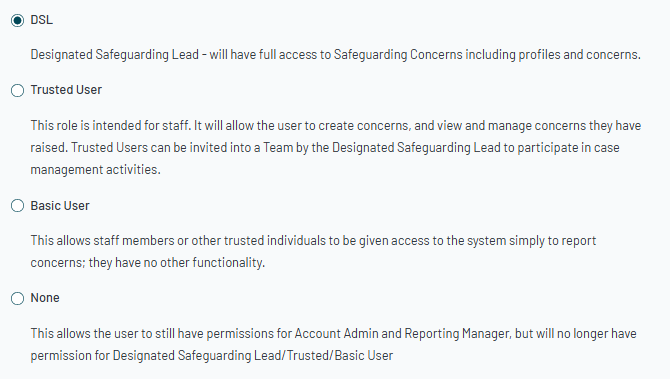
Designated Safeguarding Lead or the DSL role can also be worded as ‘DSP’ or ‘Designated Safeguarding Person’, dependent on establishment type, and this is the highest access level in MyConcern.
Trusted Users will be able to report concerns, and they can locate, and update concerns they have personally reported. DSLs can choose to share specific concerns and/or profiles with Trusted Users as and when necessary, to raise awareness, or to set them a task around the concern/profile.
Basic Users will have the ability to report concerns; however, they will be unable to locate and update concerns once they have been reported. A DSL cannot share a concern or a profile with a Basic User, and they cannot set a task for a Basic User.
None- This permission can be selected for users who will not be required to ‘Report a Concern’, however, they may be required to carry out other actions in the system (such as managing users from an admin perspective, or to create reports - see additional permissions below)
Additional Permissions
MyConcern does offer the following additional permission levels:
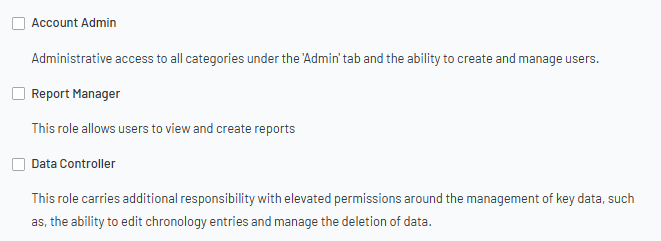
Please note: You do not need to select any of these permissions, however, if required, you can select more than one/all.
Notes:
Account Admin permission will allow a user to manage users (create new users, amend permission levels, deactivate users), and they can also configure the settings within the system (such as to personalise your category set, concern locations, referral agencies and outcomes, and profile flags, for example)
Report Manager permission will allow a user to access the MyConcern ‘Reporting Tool’ to create and view reports on the data held within the system.
Note: A ‘Report Manager’ can only create reports to include pupil names, if they are also a ‘DSL’ user; a ‘Trusted User’, ‘Basic User’, or a ‘None’ user, with ‘Report Manager’ permission can only create anonymised reports.
Data Controller is an elevated permission level, allowing a user to delete chronology entries on a concern or profile, and to edit the content within a concern, as and when necessary. Due to the nature of this functionality, we recommend this permission is for the lead DSL or a handful of your safeguarding leads only.
Was this article helpful?
That’s Great!
Thank you for your feedback
Sorry! We couldn't be helpful
Thank you for your feedback
Feedback sent
We appreciate your effort and will try to fix the article